
Appearance
Reviews dashboard
Click the Reviews button at the very top of the page to display the reviews list. If you're already in a review, click the Reviewable icon in the top left, then click Reviews. Here, you'll find all open pull requests in which you are a participant. These PRs have either been created by you, assigned to you, contain comments from you, or mention you (or a team you belong to). Reviewable automatically updates this list at least once per minute (and data held in Reviewable is updated in real time), so there's no need to reload the page.
TIP
If PRs appear to be missing from the list, try clicking the Include stalled pull requests/reviews link at the bottom of the panel. You may also want to click the green Also show team reviews or Also show private reviews buttons at the bottom if they're showing and you haven't yet granted those permissions. Finally, if PRs are still missing, check whether the relevant organizations have OAuth app access restrictions turned on.
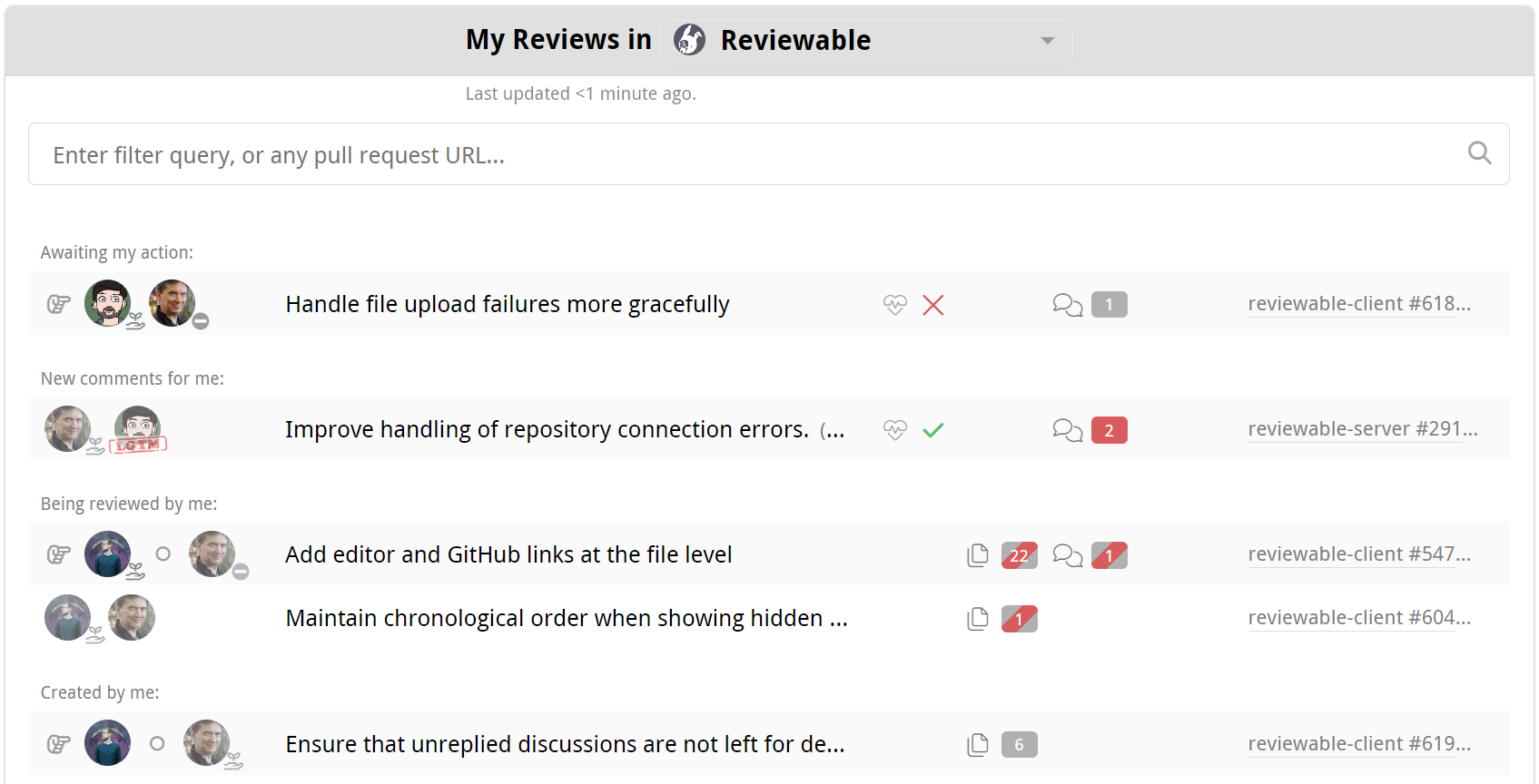
PRs are sorted into groups ordered from most to least relevant, such as Awaiting my action coming before Assigned to me. Within each group, PRs are sorted in chronological order, oldest first. The intention is that the PRs appear in the order you ought to deal with them. You cannot change the sort order, but you can filter the list instead (see below for details).
Two of these groups have extra logic worth calling out:
- Awaiting my action shows PRs that are waiting only on you first. The logic that determines if a PR is waiting on you (or an agent) is described here but can be customized by a review completion condition.
- Needing my agents' attention combines three subgroups for your agents: reviews awaiting their action, reviews with new comments for them, and reviews they are working on, with items appearing in that order. Inclusion is based on both published activity and whether an agent has pending drafts, but without peeking into the drafts' details.
You can constrain the list to a specific organization by selecting it from the dropdown menu in the panel's header. Your selection will be automatically saved for future visits. You can also view all of the PRs in a specific repository by clicking one of the “N open reviews” links in the Admin Center, or by entering the full repository name and clicking on the "Go to dashboard for..." link under the query field.
TIP
Loading the list of reviews for a single organization or repository will be much faster than doing so for all your repositories.
You can further modify the view with the various toggles and filters on this page. If a specific pull request isn't showing in the list, you can simply paste its URL into the filter field to access it directly.
The time since the list of PRs was last updated is displayed under the header. The list refreshes automatically at regular intervals, but you can also force an immediate refresh by reloading the page.
TIP
By default, the dashboard also includes up to ten PRs closed or merged in the last three days, selected by most recent update. You can filter reviews by +open,draft,queued to hide them, or Show more concluded reviews to expand the time window and remove the count limit, repeating if necessary.
Review state
Each review in the listing indicates the state of the review, in more-or-less real time. People whose attention the review currently needs are show to the right of the , while other participants follow the . Each avatar is decorated with the participant's current most important status, including PR authorship, GitHub approval ( approved or changes requested), discussion blocker, and LGTM. The rest of the line shows the pull request summary, current milestone, and labels (if any).

The icon indicates that the repository for this PR is not connected to Reviewable and the review will update on demand only. In such cases, the counters may be out of date. An administrator can connect the repository from the Admin Center.
A icon indicates a stalled review that has not been updated in over two weeks.
Counters reflect the same information as you'll see on the review page:
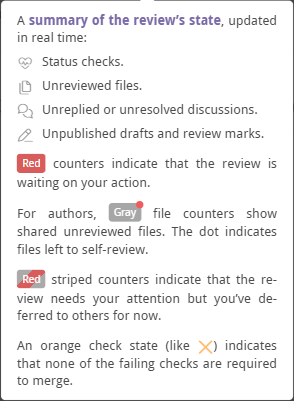
If a PR is ready for merging, the status checks are successful, and all the counters are zero, then a merge button appears in the state column instead. This lets you quickly merge completed PRs, but doesn't give access to merge options — open the review page to access those.
Other possible states include Queued for merge, Merged, Closed, and Archived, which automatically applies to reviews that have been inactive for some time. Simply open an archived review to unarchive it.
TIP
A PR won’t show a state until a corresponding Reviewable review has been created.
Open a review
Click on a PR to open the review, or hold down the appropriate modifier key to open it in a new tab. If a is shown, clicking on the listing will open a new review and insert a link into the description for the PR. If is also shown, this may begin a free trial.
Click the link on the right end of a listing to access the pull request on GitHub.
Filter reviews
Use the search bar to search or filter by PR summary, repository, number, milestone, labels, author, or blocking reviewer. Results update instantly, and the query appears in the URL so you can easily bookmark or share it.
You can also use the special filters in the table below, adding either a + or - prefix to the special term (such as +open) to require or prohibit the specified condition respectively.
Add an OR operator to the positive filter by entering a comma. For example, +needs:review,needs:fix will filter for all reviews that need work, or have a failing check. A negative comma list excludes reviews that match every predicate in the list. Use separate negative terms such as -needs:review -needs:fix to exclude reviews matching either predicate. More complex boolean expressions are not supported.
Use double quotes around a phrase or a predicate value containing spaces, such as "build failure" or +label:"good first issue". Spaces combine terms with AND. Number searches match the beginning of the pull request number.
Incomplete or invalid predicates show a red outline while the last valid query remains active. If nothing matches, the list shows No matching reviews. The file and discussion matrices use the same syntax with their own predicates.
Typing a text term highlights the first visible match. Use ↑ and ↓ to select a review and Enter to open it. For a predicate-only query, use the arrow keys to make the initial selection.
| Filter | Meaning |
|---|---|
±open | Open PRs that are neither drafts nor queued for merge |
±red | PRs with red counters |
±deferred | PRs with deferred counters |
±mine | Created, assigned, and requested PRs |
±label:name | PRs with given label. Use quotes for labels containing spaces. |
±needs: | |
review | Incomplete reviews |
fix | Reviews with failing checks |
merge | Completed and clean reviews |
me | Reviews waiting on you |
author | Reviews waiting on author |
reviewer | Reviews waiting on a reviewer |
±am: | |
author | Created PRs |
assigned | Assigned PRs |
requested | Requested reviewer PRs |
±draft | Open draft PRs that are not queued for merge |
±queued | Open PRs queued for merge |
±merged | PR that was successfully merged |
±closed | PR that was closed without merging |
±public | PRs from public repos |
±private | PRs from private repos |
±starred | PRs from repos you starred |
±watched | PRs from repos you're watching |
±by:username | PRs authored by given user |
±with:username | PRs involving given user (or team) |
The open, draft, queued, merged, and closed filters are mutually exclusive. Closed and merged states take precedence over queued or draft status, and queued takes precedence over draft. A PR counts as queued when it has a merge queue entry or the repository's configured merge label.
Your own files contribute to +red once you start self-reviewing, including with a draft mark, or the completion condition designates you as a reviewer. Optional self-review never matches +deferred; designated author reviews follow the normal deferral behavior.
TIP
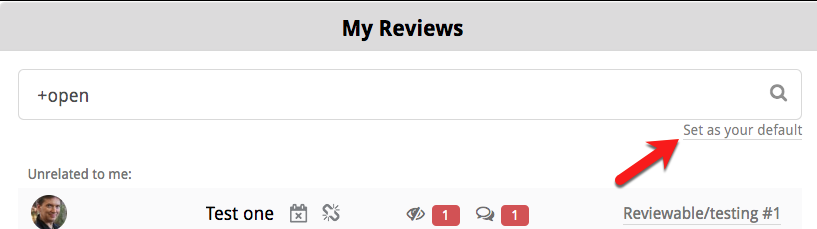
Click the small Set as your default link to set the query that will automatically be applied when you load the page.
If shown, you can click the Include stalled pull requests/reviews link near the bottom of the panel to exclude or include any stalled PRs. The current state of this toggle is reflected in the URL, so you can bookmark it.
Other toggles
At the bottom of the Reviews page, you’ll find two toggle buttons:

Show pull request not yet connected to Reviewable:
If this toggle is on, the list will include PRs for which a review has not yet been created. Such a PR will be indicated with a , and clicking that PR will connect that PR to a review and insert a link into the PR description. You may want to turn off this toggle if you only want to see PRs from connected repositories.
Also show pull request you’re not involved with from all repos to which you can push:
If this toggle is on, the list includes all open PRs from repos where you have commit privileges, even if you're not a participant. This is useful if you need to monitor repos for incoming PRs, such as if you're a manager, or an admin on an open source project.
Optionally, you can restrict this set of repos by clicking the icons/links in the text of the toggle to only show repos that you've watched or starred on GitHub, or connected repos (repos connected to Reviewable). This can be useful if you have push permissions to a lot of repos and you don’t want to see random open source repos while at work.