
Appearance
Agent Identities and MCP Server
Reviewable provides an MCP server that lets AI agents interact with code reviews, and a CLI for direct use in scripts or automation. Agent identities control how each agent appears and operates in Reviewable, and what they can access, giving you visibility and control over agent activity. This page covers how to set up and run the MCP server or CLI, and how to manage agent identities.
Creating an agent identity
You can manage sub-identities of your own account to be used by agents or other automation tools inside Reviewable. This makes it easier to distinguish agent activity from your own, since agents operate under your GitHub account and have no separate identity there.
DANGER
GitHub is not aware of these sub-identities, so all actions taken by agents there will be in your name and with your permissions.
Just like with a regular PR author or reviewer, each agent that you provision takes on a fixed role that affects the perspective from which it views pull requests, and whether its review marks count toward review completion (customizable using completion conditions).
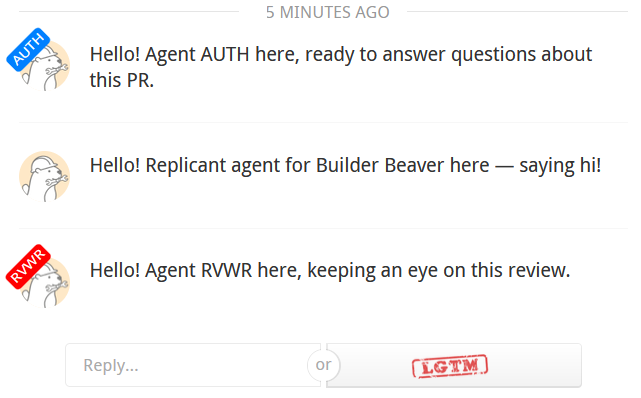
To provision a new agent, open Account Settings and click Provision new agent. There are three roles to choose from:
- Author: the agent will have its own sub-identity and — crucially — assume the role of an author on any pull requests you create.
- Reviewer: the agent will have its own sub-identity and assume the role of a reviewer on all pull requests, including your own.
- Replicant: the agent will have no sub-identity of its own and act entirely in your name.
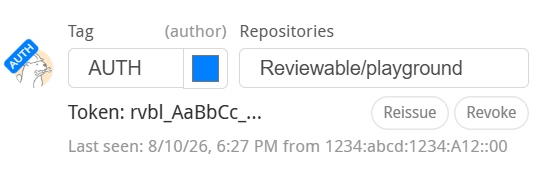
After selecting the agent role you'll be shown its API bearer token. This is the only time this token will be displayed so be sure to copy it. Keep this token safe as it provides full access to Reviewable with no further authentication. You can reissue the token at any time, which will immediately invalidate the old one.
Customizing an agent identity
You can set an agent's tag, consisting of up to 4 uppercase letters and a background color, to help you tell multiple agents apart. For agents with their own sub-identities, the tag will be added to your username and avatar to distinguish the agent from you. Tag changes take effect immediately, including for all past interactions — just like when you change your own avatar or username.
You can also constrain the agent to a subset of the organizations and repositories to which you have access. Specify a comma-separated list of OWNER/REPO globs; if any one matches then access will be allowed. For example, work/* grants access to all repos in the work organization, */special-* grants access to repos that start with special- in any organization, and */* grants access to all repos in all organizations (the default setting).
Retiring an agent identity
You can revoke the token, which will retire the agent, though you can reactivate it at any time by clicking +n retired agents.
TIP
Agents are never completely deleted (only retired) to maintain data integrity for any reviews they might have participated in.
MCP server and CLI
The reviewable npm package connects your agent to Reviewable. Once installed and configured, you can run it as an MCP server or use it as a CLI tool.
Setup
TIP
The steps for wiring an MCP server into your agent vary by tool, so have your tool's MCP setup documentation handy before proceeding.
Before running the package, you'll need to:
- Install Node.js version 20 or higher.
- Install Chrome or Chromium. It's probably already available on your personal computer, but if you need to set it up in CI you can use the command
npx -y reviewable@latest install chromium. Run the installation command again after updating Reviewable so the Chromium revision stays aligned with Reviewable's installed Playwright dependency. If system Chrome is managed by enterprise policies that interfere with headless navigation, setREVIEWABLE_COMMAND_BROWSER=chromiumto use Playwright-managed Chromium directly;auto(the default) andchromeare also supported. - Set a
REVIEWABLE_URLenvironment variable tohttps://reviewable.ioor the URL of your local instance of Reviewable (e.g.,https://internal.reviewable.cloud). - Set a
REVIEWABLE_API_TOKENenvironment variable to your agent's secret token copied from the agent identity steps above.
The reviewable npm package can be run in one of two ways:
- Download and execute it directly with
npx -y reviewable@latest. This has the advantage of automatically updating to the latest version (sooner or later), but carries some extra overhead each time you invoke it. - Install the package with
npm install --global reviewable@latestthen run it simply asreviewable. This is a little more efficient, but leaves it up to you to update the package every so often by running the same installation command again.
Starting the MCP server
Execute npx -y reviewable@latest mcp to start the MCP server (or reviewable mcp if installed globally). You can run this directly from a terminal to verify it works.
If you're on Linux and the MCP server is timing out on startup, you may need to wrap the invocation above in xvfb-run -a to provide enough of a display for Chrome to load Reviewable. Although Chrome should be able to work without a display in headless mode, some users have found this a necessary workaround.
TIP
Wondering what to do next? Check out our MCP server blog post for a few workflow ideas.
Using the CLI
You can use the reviewable command as a CLI tool; run reviewable --help to see a list of available commands, and consider adding our skill stubs to your agent. (Make sure to tweak the reviewable command based on how you've decided to run the package.)
If you can't find a feature you need, first make sure you're running the latest version of the reviewable package (and the Reviewable server, if you're on Reviewable Enterprise). If it's still missing then please get in touch and we'll see if we can get it added for you!